
New · 3D Treatment Plan Studio

Let patients see their treatment in 3D, and decide sooner.

Build the treatment plan on a realistic 3D mouth. Crowns, veneers and implants settle into place and the treatment plays session by session. Send the patient a link, a video in 5 languages or a PDF with a 3D page, all inside your CRM.
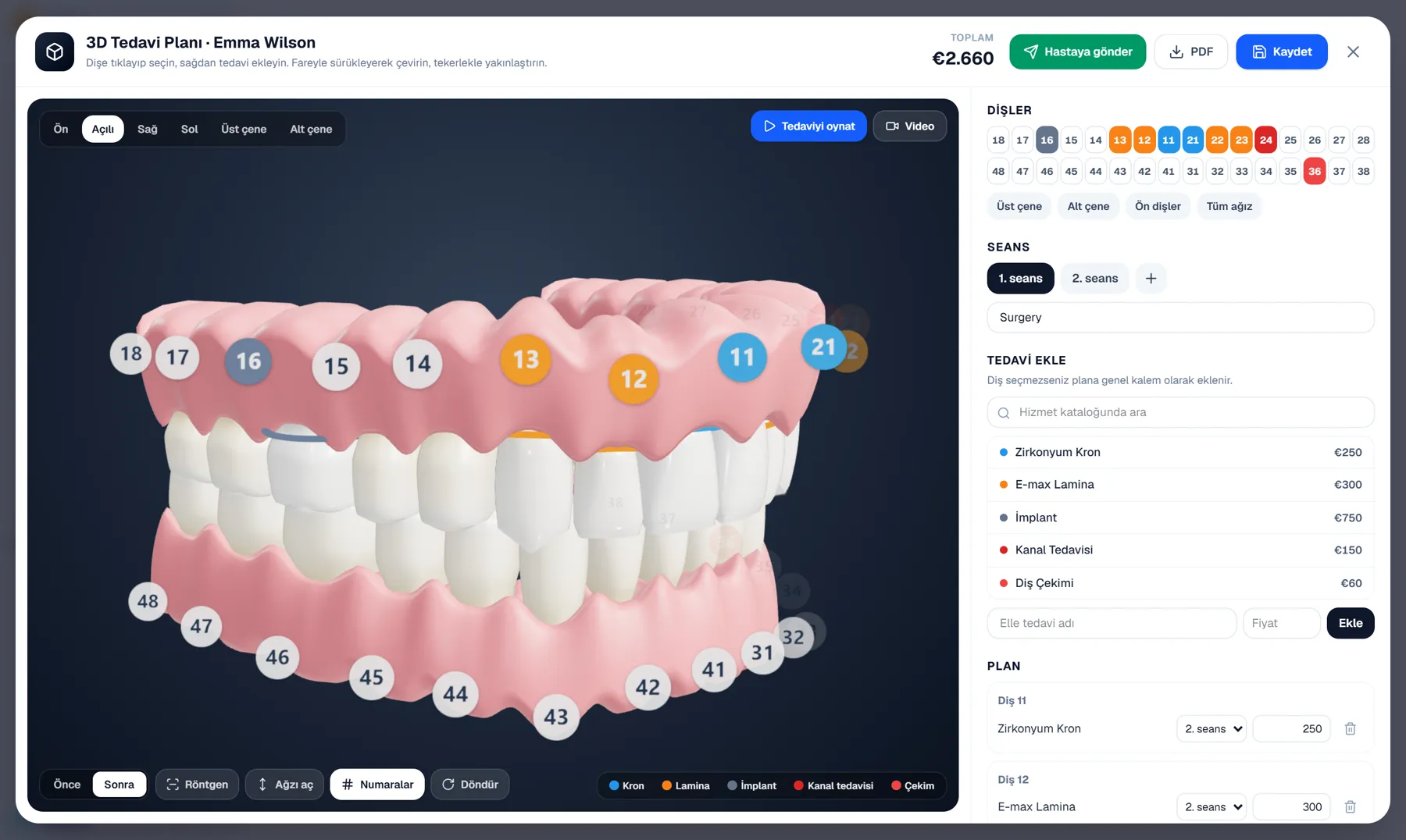
iri CRM 3D Treatment Plan Studio: 3D mouth, tooth chart, sessions and prices

A realistic 3D mouth

32 teeth, gums and both jaws. Zirconia crowns, E.max veneers and implants look like the real material. Patients turn and zoom with a finger.

Treatment animation and video

"Play treatment" animates every step, session by session: the tooth comes out, the implant is placed, the crown settles. Download it as an mp4 in one click.

A private link for the patient

Patients open their plan in 3D on their phone, play it and see sessions and prices. No account or app needed.

Sample video

This is the video your patient receives

A plan with an extraction, an implant, zirconia crowns and E.max veneers, made in one click, in English.

Real materials

Crowns, veneers and implants that look real

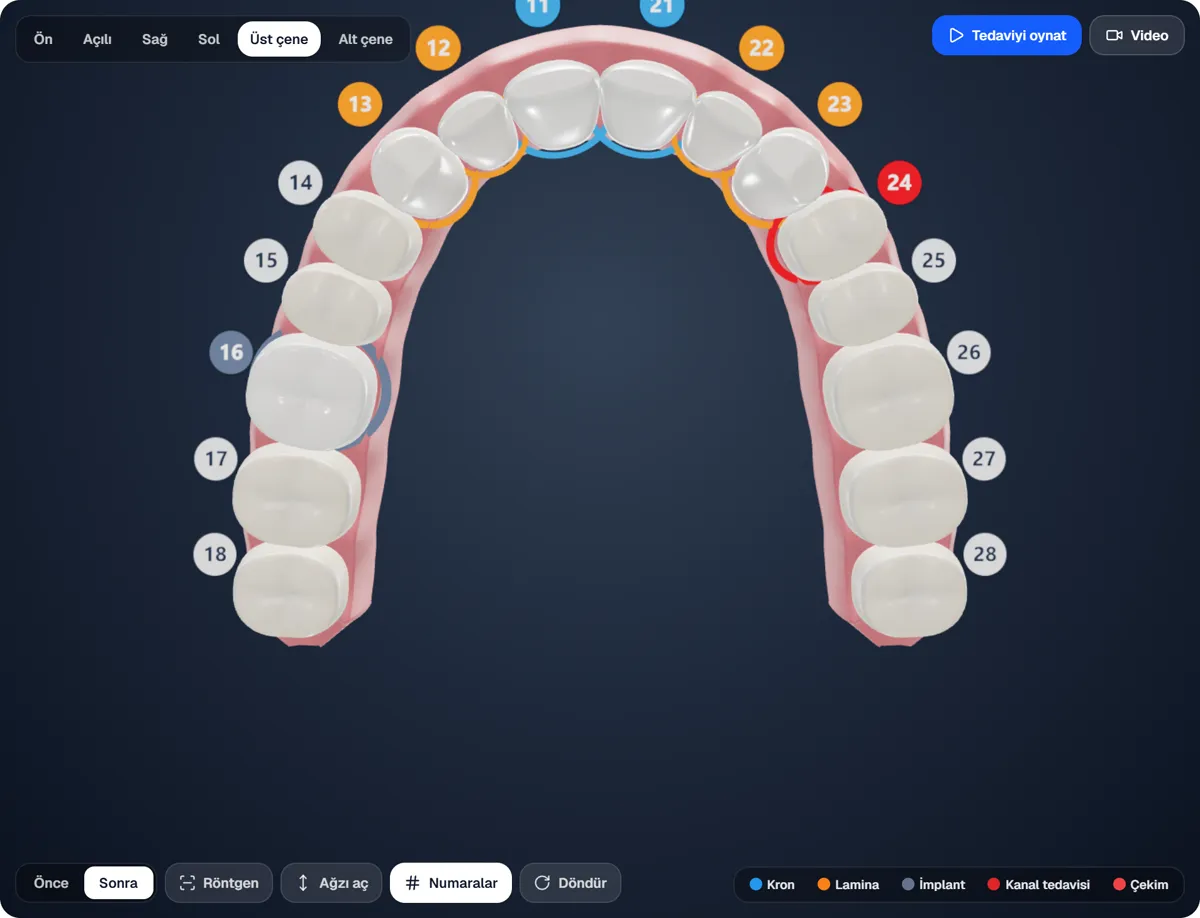
Treated teeth are not painted in colours; they look like the material that will be used. A thin coloured ring at the gum line and the number tag tell which treatment goes where.
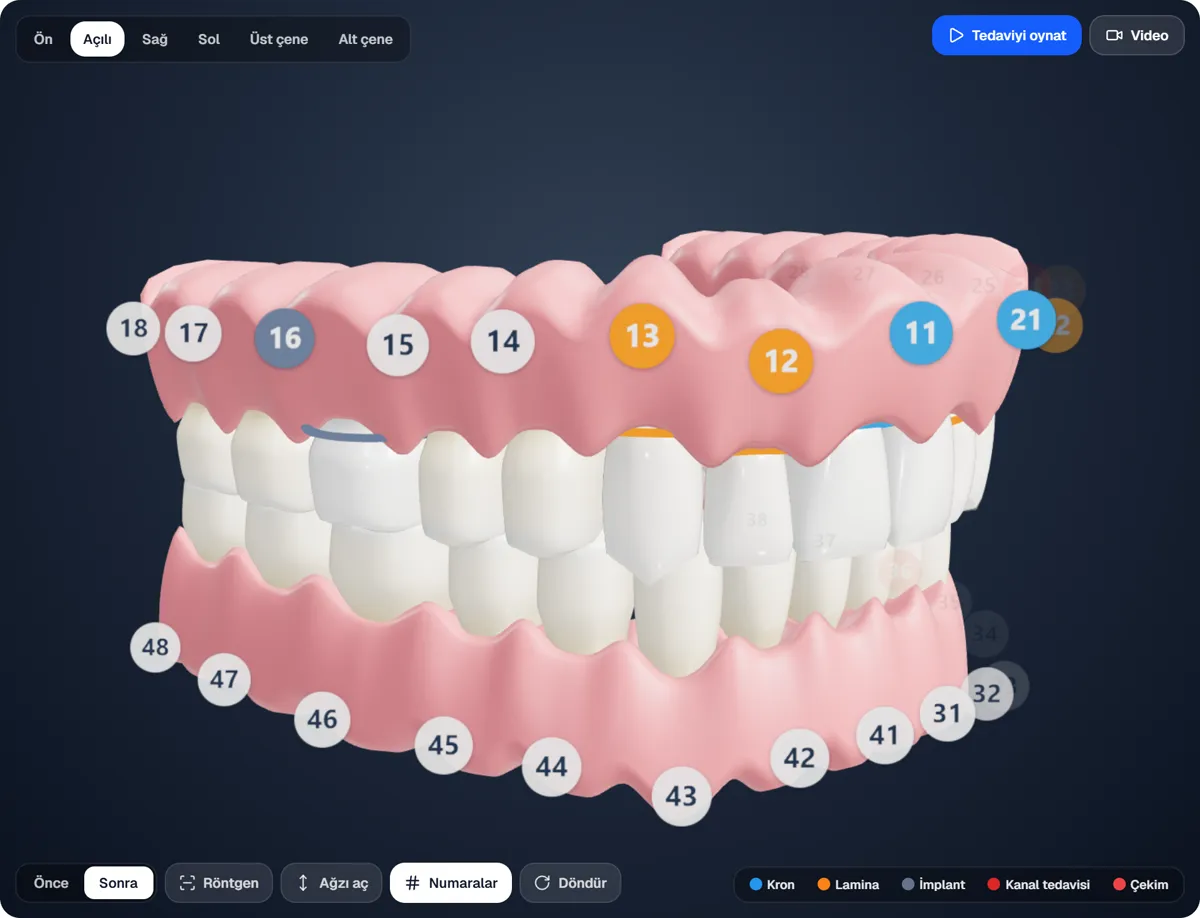
Zirconia crown: bright, even, clean white
E.max veneer: glassy, with a pearly sheen
Extraction: a dashed outline where the tooth was
Six views: front, angled, right, left, upper and lower jaw; open mouth and slow turn
Zirconia crowns and E.max veneers on the 3D mouth
X-ray mode

Show what is under the gums

One click makes the gums see-through: roots, the titanium implant screw and the root canal filling show. The patient sees how the implant sits.
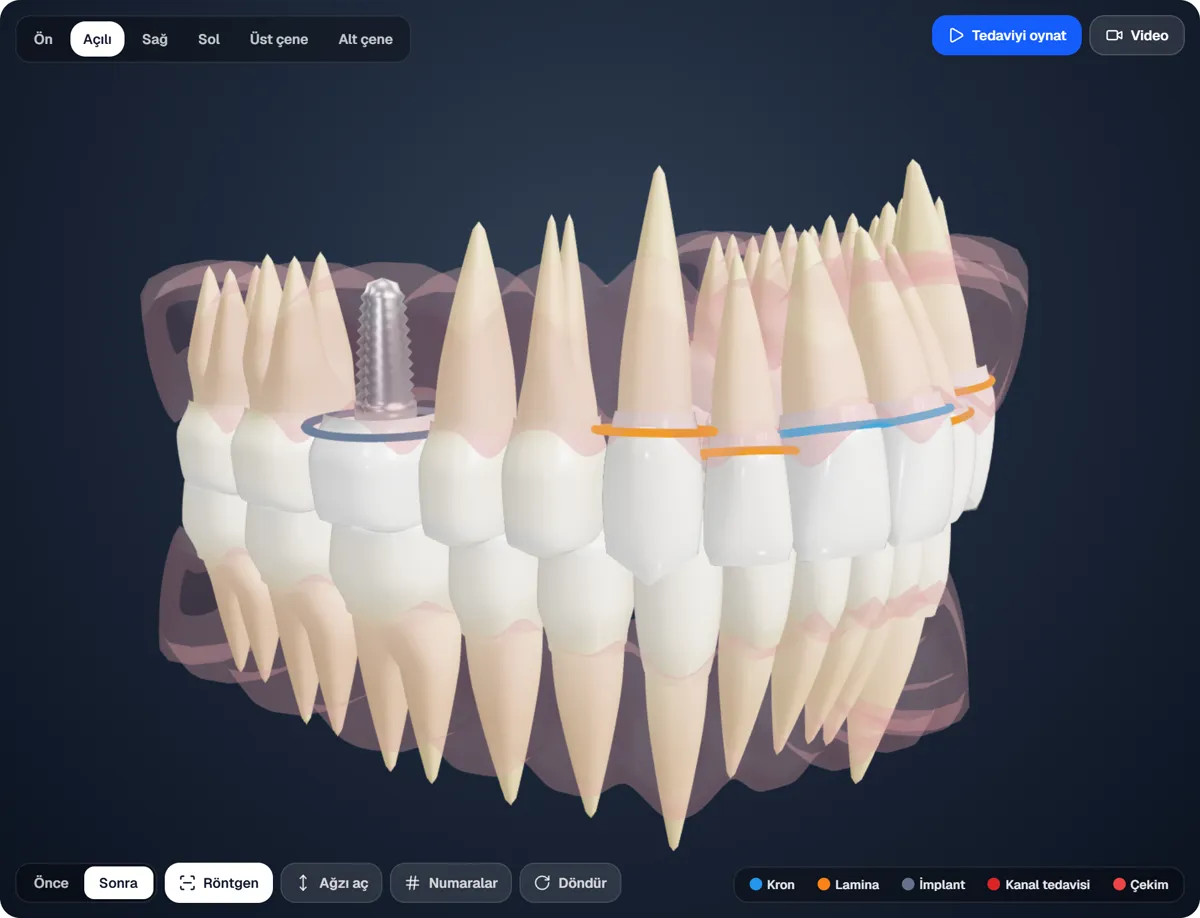
In the animation the screw turns into the bone and the crown is set on it
Root canal treatment shows inside the root
Upper and lower arches can be viewed from the biting side
Titanium implant screw in X-ray mode
Animation and video

Play the treatment, download it as a video in 5 languages

The plan becomes an animation, session by session: the camera turns to each step and a caption says what is done. Download the video in the patient's language (English, French, German, Polish or Turkish) and send it on WhatsApp.
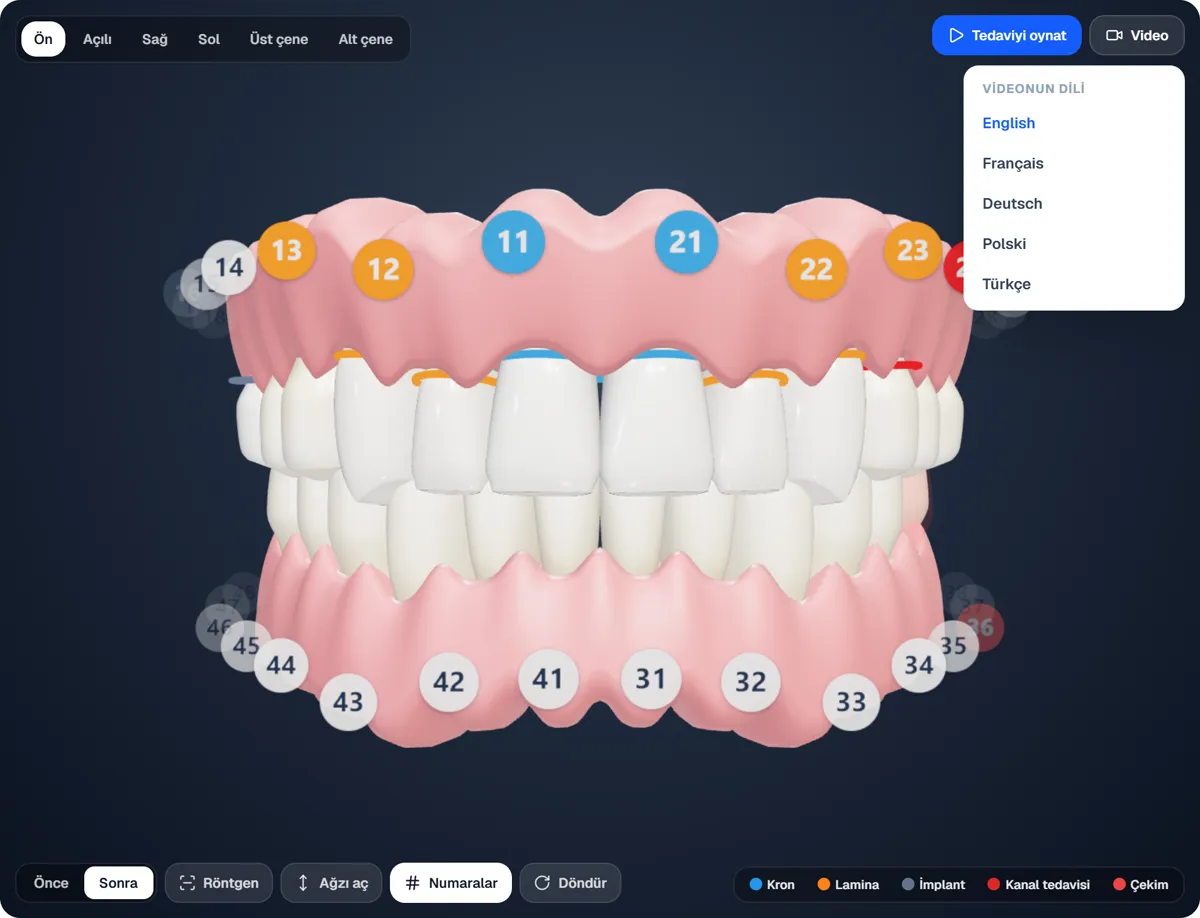
1280×720 mp4 that plays on phones, WhatsApp and computers
Your clinic's name is on the video
Treatment names from your catalogue are translated automatically
The video is made in the background; the screen stays smooth
Video language menu: English, Français, Deutsch, Polski, Türkçe
Patient link

Patients open their plan in 3D on their phone

"Send to patient" makes a private link. The patient turns the mouth, plays the treatment and sees the sessions and the total. English and Turkish are one tap apart.
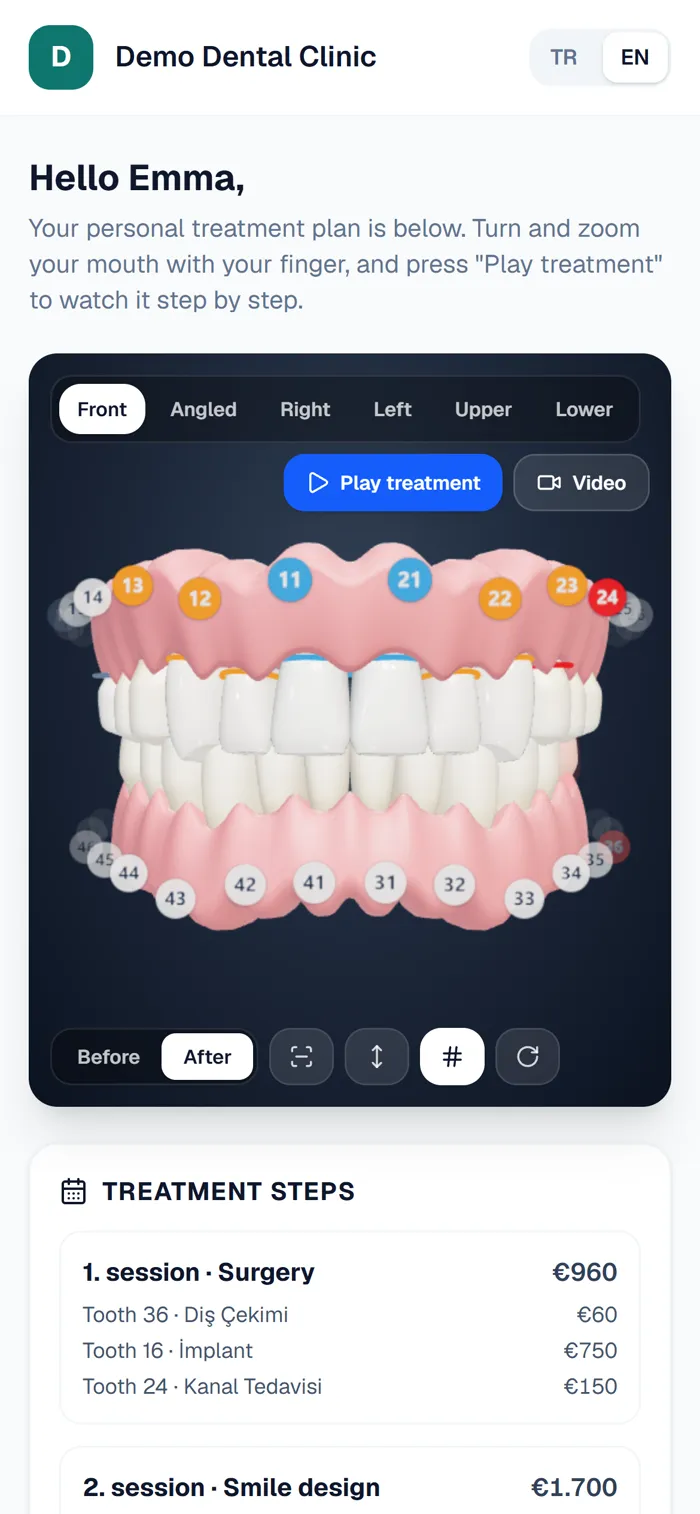
Send on WhatsApp with a ready message in one click
See how often and when it was last opened; you are notified on the first view
Only the first name, plan and price on the page; no surname or phone
Turn the link off whenever you like
The 3D treatment plan page on a patient's phone
PDF proposal

Your PDF proposal gets a 3D page

The PDF from the studio adds 3D pictures (front, upper and lower arch) and a coloured key of which treatment goes on which tooth, next to the usual plan pages.
Your clinic's logo, colour and cover photo
Sessions, prices, discount and payment terms
Currencies: TRY, EUR, USD, GBP, with catalogue prices converted for you
Upper arch from the biting side with coloured tooth numbers

A 3D treatment plan in 3 steps

In the panel, open Treatment Plans and press "3D Plan Studio".

01

Pick the teeth, add the treatment

Click teeth on the chart or right on the 3D mouth and add the treatment from your catalogue. Price, currency and sessions are worked out for you.

02

Show it on the 3D mouth

Compare today with the result using Before / After, play the treatment and show the implant in X-ray mode.

03

Send a link, a video or a PDF

Send the link on WhatsApp, download the video in the patient's language or send a PDF proposal with its 3D page.

Video: English · Français · Deutsch · Polski · Türkçe|Classic treatment plan builder
FAQ

Frequently Asked Questions

No. The 3D studio runs in the panel, in the browser. Patients open their link in their phone's browser; no app or account is needed.
English, French, German, Polish and Turkish. You pick the language when downloading; sessions, treatments and tooth numbers are written in it. Treatment names in your catalogue are translated automatically.
Each link is made with a long random key that cannot be guessed. The page shows only the patient's first name, the plan and prices; no surname or phone number. You can turn the link off at any time and see how often it was opened.
Extraction, implant, zirconia and porcelain crowns, E.max veneers, bridges, root canal, fillings, whitening, cleaning and gum treatment. The kind is read from the treatment's name; anything else is marked on the tooth too.
Nothing changes. The classic plan builder stays as it is; the 3D Plan Studio sits next to it. You can open any plan in the studio.

Start Your 7-Day Free Trial Today.

Cancel anytime. Join 500+ fast-growing companies scaling their sales with İri CRM.